• Skip to primary navigation
  • Skip to main content
  • Skip to primary sidebar
  • Skip to footer
  • Self-Publishing
  • Author Blogging
  • Sitemap
  • Fonts/Typography

The Book Designer

Practical advice to help build better books

by selfpublishing.com

COACHING


PUBLISHING


WRITING


PRODUCTION


FREELANCE


WRITING JOBS

  • Home
  • About
  • Articles
  • Contact
  • Shop
You are here: Home / Book Design / 5 Favorite Fonts with Hidden Type Ornaments

5 Favorite Fonts with Hidden Type Ornaments

by Joel Friedlander on April 2, 2012 21 Comments

Table of Contents

  • Font Extras Are Like Hidden Treasure
  • Minion Pro
  • Adobe Caslon Pro
  • Warnock Pro
  • Zapfino
  • Chaparral Pro
  • Resources

If you’re a video gamer, or if you have one in the house, you may be familiar with the phenomenon of “easter eggs.”

“A virtual Easter egg is an intentional hidden message, in-joke, or feature in a work such as a computer program, web page, video game, movie, book, or crossword.”—Wikipedia

Google is pretty well-known for placing easter eggs in various places on their search screen, and it can be fun to hunt for “hidden treasure” in otherwise normal software.

In the same way, while browsing in the Glyphs palette in InDesign, one day I discovered, way down at the bottom of the listing, that the font I was looking at—Minion Pro—had many type ornaments included with the rest of the font.
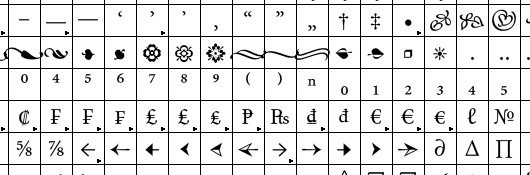
5 favorite fonts with hidden type ornaments

The adoption of the Open Type format for fonts in the late 1990s vastly increased the number of glyphs—each letter, punctuation, or any other character in the font—that you could include in the font software. Open Type has become the standard for fonts, and it has lots to recommend it.

Font Extras Are Like Hidden Treasure

Type designers have used this extra capacity for lots of things, mostly to expand the number of accented letters and international symbols available, so Open Type fonts can be used in many languages. You can see some of those characters in the Minion font shown above.

But other designers have been more whimsical, and included type ornaments in their fonts.

Sometimes these are specially designed to match the style of the font itself, sometimes they seem to just be added in.

What makes these unusual is that you don’t even necessarily know you own them. Most ornaments you see are from special, ornament-only fonts like Zapf Dingbats or Linotype Decoration Pi.

These ornaments come to you unannounced, but no less welcome. And because they are right in the font, they are very easy to use.

Here are my 5 favorite fonts with hidden type ornaments. These samples show just a few of the ornaments available, and some fonts have many more than others.

Minion Pro
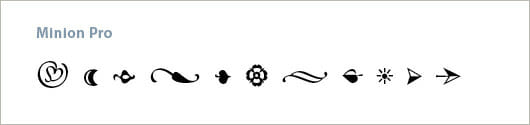
Fonts-with-ornaments-Minion-Pro
Designed by Robert Slimbach in 1990 for Adobe Systems. These naturalistic ornaments match well with the oldstyle design of Minion, and the designer has consciously given them the character of hand-drawn illustrations. They are clean and modern with strong color.

Adobe Caslon Pro
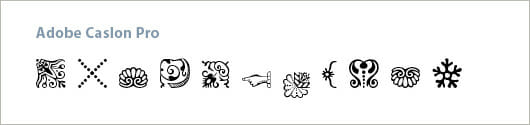
Fonts-with-ornaments-Caslon-Pro
Adobe Caslon is a variant designed by Carol Twombly and based on William Caslon’s own specimen pages printed between 1734 and 1770. (Wikipedia) The mostly floral ornaments have a uniform color and line weight and can be combined into amazing shapes.

Warnock Pro
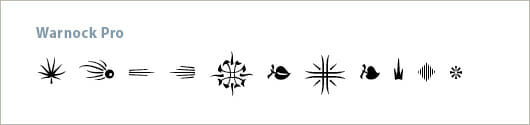
Fonts-with-ornaments-Warnock-Pro
Designed for Adobe Systems in 2000 by Robert Slimbach. When I discovered these ornaments hiding inside the useful text font Warnock Pro, I was amazed. Since then I’ve used these on numerous books. Most type ornaments are symmetrical, with floral and geometric motifs predominating. But these are something else, and the natural styling and flair they bring to a page of type is delightful.

Zapfino
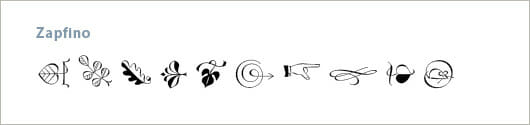
Fonts-with-ornaments-Zapfino
Designed for Linotype by typeface designer Hermann Zapf in 1998. Zapfino is an organic and fluid calligraphic script font that comes with dozens of alternate and “swash” characters so you can really customize it. All the ornaments have the style of pen-drawn illustrations, in keeping with the writing style of calligraphy masters.

Chaparral Pro
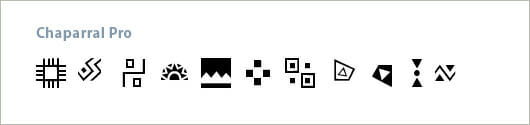
Fonts-with-ornaments-Chaparral-Pro
Designed for Adobe Systems by Carol Twombly in 1997. As the name implies, Chaparral was intended to be a new kind of typeface. “Like the drought-resistant brush that blooms on the arid coastal range near Twombly’s California home, Chaparral’s highly functional design is surprisingly beautiful.”—Adobe Systems. The ornaments perfectly reflect the same aesthetic, and many are designed to create borders and other typographic effects. Chaparral is the last in a series of incredible typefaces designed by Twombly at Adobe.

Resources

Extra: Free From Myfonts: The fonts in this article will all cost you something, but you can experiment with a font that contains “hidden treasure” in the form of matching ornaments, too. Have a look at Fertigo Pro at Myfonts.com. It’s a capable font that also contains a nice selection of ornaments. And it’s free, just download it. This is a great way to experiment with type ornaments in your own book designs.

David Bergsland, a guest author here, also has a typeface with ornaments included available free of charge on Myfonts.com. Check out Contenu Book Display, one of a family of 8 styles. This one is free and will give you both a lovely typeface and ornaments with which to experiment.

More articles on fonts:
5 Favorite Fonts for Interior Book Design
5 Great Fonts for Book Covers
7 New Typeface Combinations for Book Design

Do you know other fonts with hidden type ornaments? I’d love to hear.
Filed Under: Book Design, Self-Publishing Tagged With: Adobe Caslon Pro, Adobe Systems, book design, Carol Twombly, Chaparral Pro, fonts, Linotype Typography, Minion Pro, Richard Slimbach, typography, Warnock Pro, Zapfino

journal marketing

Reader Interactions

Comments

  1. Bill Peschel says

    October 11, 2017 at 11:19 am

    “Check out Contenu Book Display, one of a family of 8 styles. This one is free and will give you both a lovely typeface and ornaments with which to experiment.”

    When I click on the link, I see a $7.77 price tag for Contenu Book Display, even though his text does say “Contenu Book Display is a free gift to users of the Contenu Family of fonts (though I have made it free for everyone).”

    Am I missing something?

    Reply
    • David Bergsland says

      October 12, 2017 at 8:35 am

      Display is the ninth font, which you get free when you buy the 8-font family. It used to be a free font, but that was years ago when it was first released. The best deal now is on my Website—just under $50 for the 17 font Contenu-Buddy Book Design group

      Reply
      • Bill Peschel says

        October 12, 2017 at 8:59 am

        Ah, thanks for clarifying.

        Reply
  2. Chris Maiocca says

    November 12, 2016 at 7:53 am

    Hi:

    Sorry, but when I go to the Glyphs pallet I do not see ornaments in the drop down on several of these…

    Any thoughts?

    Chris

    Reply
    • Joel Friedlander says

      November 12, 2016 at 10:50 am

      Which fonts are you having that problem with, Chris?

      Reply
      • Chris Maiocca says

        November 12, 2016 at 11:09 am

        I was unable to see any Ornaments for Zapfino in the dropdown :)

        While I have you Joel – what are your thoughts on Warnock Pro for a History Text?

        Many thanks!

        Reply
        • Joel Friedlander says

          November 12, 2016 at 11:22 am

          Chris, I’m out of the office at the moment but will check Zapfino when I get back. Warnock Pro is an excellent book font I’ve used on numerous books, and set properly should work well for a history book.

          Reply
  3. Angela says

    April 1, 2014 at 11:31 am

    Thanks for this great post, Joel. I had recently been rueing the loss of the ornaments in the old multiple master Chaparral I used to use. Lo, upon seeing your post in a google search, I discovered they’re embedded in the open type version I have.

    Reply
    • Joel Friedlander says

      April 1, 2014 at 12:54 pm

      Hey, that’s great Angela. I remember those multiple masters well. And it’s a real treat when you find a bunch of ornaments hidden deep in a font’s glyph set when you didn’t know they would be there.

      Reply
      • Angela says

        April 1, 2014 at 5:01 pm

        That revelation set me to checking all my other Open Type fonts for other hidden treasures. I found some in Adobe Garamond Pro, Cronos Pro, Diavlo, Fertigo Pro, and Letter Gothic Std. Thanks again for sharing!

        Reply
  4. roe says

    July 11, 2013 at 6:50 pm

    Great stuff! I knew somehow… that those page ornaments were hiding from plain sight lol

    Thanks for sharing to the world!

    Roe

    Reply
  5. Roger C. Parker says

    April 6, 2012 at 8:01 am

    Dear Joel:
    Great post: a pleasant surprise to start the day; I always like your type features.

    How about following-up with a some illustrated examples of when and how to use ornaments without adding clutter or distraction to book covers and book marketing materials?

    Always something new, thanks!

    Roger

    Reply
    • Joel Friedlander says

      April 6, 2012 at 4:40 pm

      Thanks, Roger. That’s a great idea, too, I’ve got a number of books I can show with various placements and uses for these types of ornaments.

      Reply
  6. London Crockett says

    April 4, 2012 at 6:52 pm

    Adobe Jenso Pro has a nice set of ornamentals included in the glyphs. It’s selection of weights, along with it’s elegent lines make it a favorite book and titling face for me.

    Reply
    • Joel Friedlander says

      April 5, 2012 at 10:56 am

      Adobe Jenson Pro is one of my all-time favorite text faces, too. Thanks for the tip.

      Reply
  7. David Bergsland says

    April 2, 2012 at 5:47 am

    My free (on Myfonts) Contenu Book display has a few ornaments.

    Reply
  8. Michael N. Marcus says

    April 2, 2012 at 2:13 am

    I know you don’t approve of formatting books in MS Word, but those of us who are not ready to use “adult” software like InDesign can still use type ornaments

    Clicking on the “symbols” dropdown menu provides access to a great many “wingdings.” The alphabetical library provides even more choices. Lowly Arial includes a variety of symbols and the add-on AGP has some fleurons.

    MS Word Newbies should spend time exploring all of the faces in the symbols section. This is the source of not just decoration, but also more important symbols like ligatures, musical notes, numbers, fractions, dashes, bullets and non-English alphabets.

    Tip: because the symbols can be enlarged without getting too jagged or fuzzy, they can be used as elements in logos or on posters and signs.

    Michael N. Marcus

    — http://www.BookMakingBlog.blogspot.com
    — http://www.BookFur.com (information, help and book reviews for authors)
    — Create Better Books, with the Silver Sands Publishing Series: http://www.silversandsbooks.com/booksaboutpublishing.html
    — New: deluxe hardcover edition of “Stories I’d Tell My Children (but maybe not until they’re adults),” http://www.amazon.com/dp/0983057249

    Reply
    • Daniel says

      August 23, 2012 at 12:22 am

      Is there anyway to flip the direction of an ornament, either horizontally or vertically, when using MS word?

      Reply

Trackbacks

  1. Chaparral Pro Ornaments – Typography Fall 2016 says:
    December 8, 2016 at 5:59 pm

    […] searching for which ornaments to write about, I came across Chaparral Pro on www.thebookdesigner.com.  Chaparral Pro was designed for Adobe Systems by Carol Twombly in 1997, intended to be a new kind […]

    Reply
  2. Embellishing my knowledge in Ornaments | Designblog says:
    March 27, 2013 at 9:37 am

    […] is a link to: 5 Favorite Fonts with Hidden Type Ornaments – Minion Pro, Adobe Caslon Pro, Warnock Pro, Zapfino and  Chaparral Pro. Between my searches […]

    Reply
  3. Writing on the Ether | Jane Friedman says:
    April 5, 2012 at 4:16 am

    […] 5 Favorite Fonts with Hidden Type Ornaments, Joel Friedlander at The Book Designer brings to light the virtual “Easter eggs” that […]

    Reply

Leave a Reply Cancel reply

Your email address will not be published. Required fields are marked *

This site uses Akismet to reduce spam. Learn how your comment data is processed.

Primary Sidebar

Get the Advanced Publishing Kit

Topics

  • Audiobooks
  • Author Blogging 101
  • Book Construction Blueprint
  • Book Design
  • Book Printing
  • Book Production
  • Book Reviews
  • Cameras
  • Contributing Writers
  • Cover Design
  • E-Books & Readers
  • Editorial
  • Guest Posts
  • Interior Design
  • Interviews
  • Journey of a Book
  • Legal Issues
  • Marketing
  • Podcasts
  • Project Focus
  • Reports
  • Reviews
  • Samples
  • Self Publishing Basics
  • Self-Publishing
  • Social Media
  • Training
  • Video
  • Webinars
  • Writing
Self Publishing Platform
Self Publishing School

COACHING

Self Publishing

PUBLISHING

The Write Life

WRITING

The Book Designer

PRODUCTION

Make a Living Writing

FREELANCE

Freelance Writers Den

WRITING JOBS

Footer

  • Home
  • About
  • Articles
  • Contact
  • Shop
  • Self-Publishing
  • Author Blogging
  • Sitemap
  • Fonts/Typography
Terms of Service
Privacy Policy
Comment Policy
Guest Author Guidelines
Why?
"Writers change the world one reader at a time. But you can't change the world with a book that's still on your hard drive or in a box under your bed. This blog exists to help you get that book into people's hands."
—Joel Friedlander

Copyright Self Publishing School All Rights Reserved. © 2022